Apps › Zoetrope
Zoetrope
Films drawn by code, and a Workshop to animate by hand: puppets, frames, sound and lessons.
How to get it
Zoetrope is installed from the NylonLabs hub. See the download page.
Changelog
0.6.2-beta (2026-10-14)
The Workshop gets a camera and a script page.
- Camera. The new Camera button shows a blue frame on the stage: what the video sees. Drag the frame to move the camera and drag a corner to zoom in or out (up to 6 times). Each change sets a camera key on that frame, and between two keys the camera moves by itself.
- How the camera gets there. For each camera key: Smooth (eases in and out), Steady, or Cut (jumps on that frame). Shake makes the camera tremble from that key to the next one. Whole stage sets a key that shows everything, and Clear camera key takes one away.
- Camera view. Tick camera view (or press C) to see a frame the way the video will show it. Play and Export video always use the camera.
- Script page. The Script button lists the lines of the animation: who says each one, what they say, a note on how it is said, and the frame it starts on. Add lines one at a time, or paste a whole script written as NAME: line. Lines can be moved up and removed, and Go shows a line's frame on the stage.
- Record a line. Record beside a line puts the recording on the timeline at that line's frame. When the speaker's name matches a puppet with a talking mouth, the mouth shapes are worked out straight away.
- Captions. Show the lines as captions puts each line at the bottom of the picture while it is said (two seconds for a line with no sound), in the camera view, when playing and in the exported video.
- Copy as text puts the whole script on the clipboard, numbered, with who says each line and its frame.
- The film grows to fit the lines when a line starts after the last frame.
- Camera keys and script lines move with the frames when frames are added or taken out, and Undo takes them back too.
- A message now says when no microphone is found, or when Windows has switched the microphone off for the app.
0.6.1-beta (2026-10-13)
More pictures in the Workshop library (127 in all, 40 new).
- Animals: horse (walking, galloping, rearing, a fire horse), boar (standing and charging), sheep and ram, snake (lying and rising).
- Myth people: every character also seated, on both knees, from the front and from behind.
- Myth props: a stool and a weaving loom.
- Fixed: the window opens at the size and place it had when it was last closed, and maximised if it was maximised.
0.6.0-beta (2026-10-12)
The installer: Zoetrope installs and runs on its own.
- Zoetrope installs by itself. The kits, the Bangers lettering, Rhubarb (lip-sync), the teacher pack and the licence texts are inside the installer. It needs no other NylonLabs app and no Studio folder.
- An installed copy opens in the Workshop. The films made by code stay on the developer PC.
- Licence check at start when installed: Commercial Edition or Education Licence. Without one it says so and closes.
- Video export without FFmpeg as a separate program. The Workshop now makes the mp4 with the encoder built into the app (H.264 + AAC, or VP9 + Opus where those are missing) and mp4-muxer (MIT).
- Not in this version: the script page and the camera planned as 0.5.1.
0.5.0-beta (2026-10-12)
The Workshop: animate by hand, frame by frame, with your own drawings, pictures, sound and script. Made for teaching animation in schools.
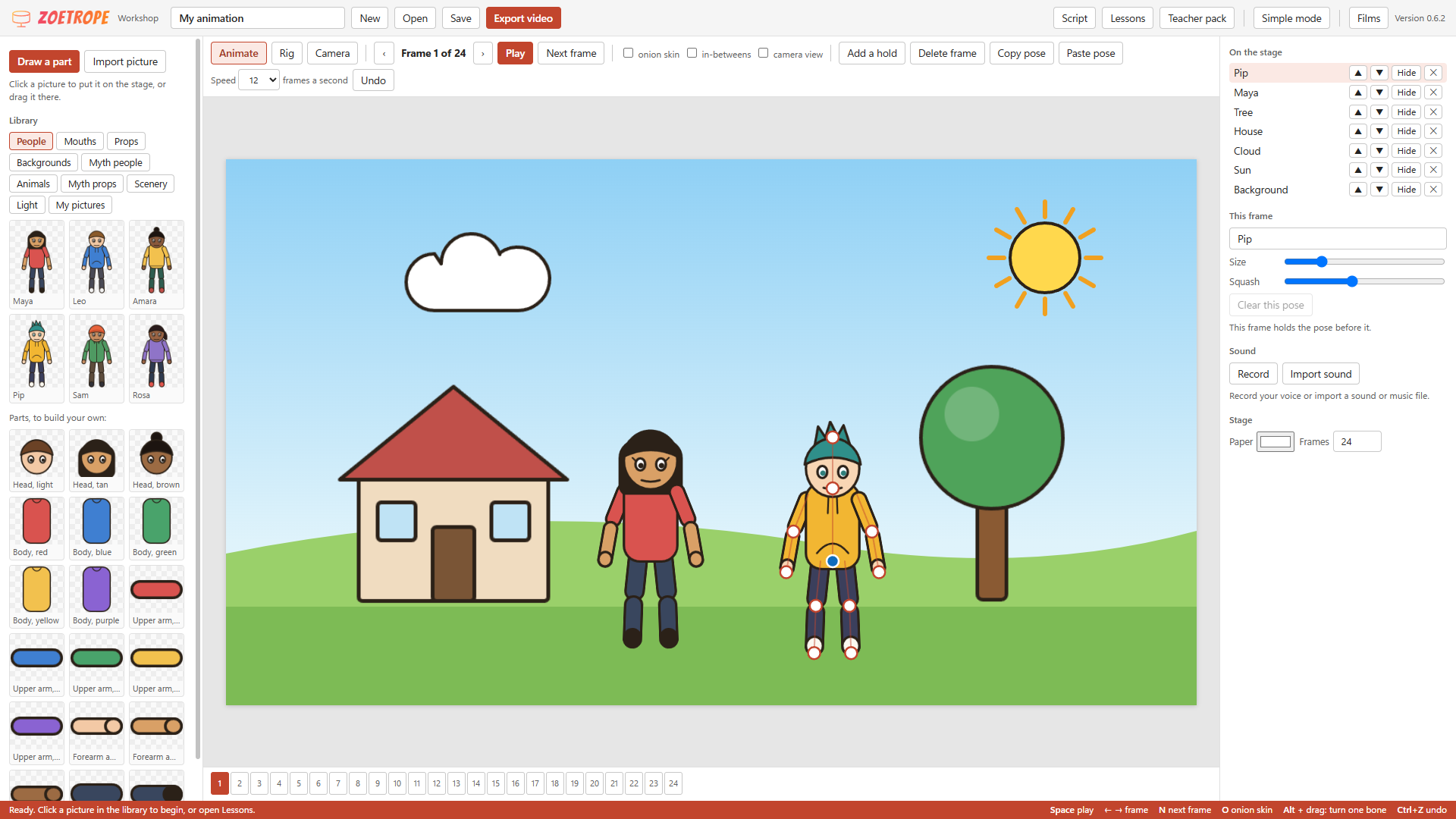
- Stage and puppets. Click a picture in the library, drag it onto the stage, or drop picture files from the computer. Everything on the stage is a puppet with bones, posed with round handles like the pose editor: the blue handle moves it, a white handle turns a bone, and the end of an arm or leg pulls the elbow or knee with it (Alt + drag turns one bone only). Size and Squash sliders for each pose.
- Frame by frame. Each pose you set belongs to the frame you are on; the frames after it hold that pose until you set a new one. Next frame (
N), onion skin (O), Add a hold, Delete frame, Copy and Paste pose, Undo. In-betweens fills the frames between two poses when you want it, and is off for pure stop motion. - Ready-made people lead the People section: Maya, Leo and Amara, and three more people (a young surfer, a waver and a passer-by) as Workshop puppets. The loose parts to build your own are under them. Heads now have hair that covers the whole top of the head.
- Rig (model rigger). Add pictures to a puppet, drag them into place, draw bones on the stage from joint to joint, fix each picture to a bone, set order, size, turn and flip. Any picture can be the talking mouth.
- Asset maker. Draw a part: brush, eraser, line, box, circle, fill, layers, undo. Import picture opens a photo or scan to cut out: the lasso keeps what is inside, Remove paper makes white paper see-through. Pictures are saved trimmed, in My pictures.
- Library drawn by the app: people parts, nine mouth shapes, props (ball, box, star, sun, cloud, tree, house, flower) and three backgrounds.
- Sound. Record from the microphone or import a sound file; drag it along the frames. Lip-sync places the mouth shapes on a puppet from the sound (Rhubarb, on this computer); click a letter to change a shape.
- Project files. One
.zoefile per animation, to hand in or carry to another PC. No accounts, nothing online. Unsaved work is kept and offered when the Workshop opens again. - Export video: an
.mp4with the sound. - For schools. Five built-in lessons with starter projects and step lists (bouncing ball, wave hello, walk cycle, make it talk, your own character) and the twelve principles; Simple mode for a first lesson; a printable Teacher pack (lesson plans, marking guide, handout; a first draft, not matched to a curriculum).
- Tested in the app: 22 checks pass (posing, frames, in-betweens, rigging, drawing, cut-out, lip-sync on a real voice line, save and open, video export). Not tested here: recording from a microphone, dropping files from the computer, and playback speed (the check window cannot do these).
- Added later the same day: the ancient myths set in the library. 87 pictures in five new groups and under Backgrounds:
- Myth people: King, Queen, Hero, Soldier, Smith and Weaver, each standing, pointing, walking, kneeling and with arms up. They are whole figures in set poses, not puppets with bones: swap poses between frames, or flip and turn them.
- Animals: eagle (two wing positions, perched, pecking), spider (two steps, legs in, on its thread), gull, moth, wisp, the wooden horse.
- Myth props: crown, jar, amphoras, lyre, boulder, pomegranate, flower, rose, feather, candle, wall torch, brazier, sun, cloud.
- Scenery: column, three columns, stone wall, city wall, olive tree, tree, rock face, mountains, cloud bank, grass edge.
- Light: three flames to swap, firelight glow, sparks, sparkles, light shafts, mist, dust in the light, night shade. Lay them over the scene.
- Backgrounds: day, dusk mountains, night sky, temple, underworld cave, old paper.
- Tested: all 87 draw, and a background, a person and an animal were put on the stage and moved (24 checks pass in all).
- Coming in a later version: the script page and the camera, and a school install with everything inside the app.
0.4.1-beta (2026-10-12)
Fixes for the three things you reported, and what a test round over the whole app turned up.
- The Series tab is gone. The film list on the left is the one place to pick a film. The tabs are now Shots, Script, Storyboard, Rig and poses, Renders, Thumbnail, Assets and Waves, on the keys
1to8. - Camera guides go away when you turn them off. The checkbox and
Gboth work. - The pose editor moves every joint. Round handles sit on both hands, both feet, the head and the hips. Drag the one you want: hands and feet move, the head turns and tilts, the hips lean and crouch. The handle under the mouse lights up, and no Shift or Alt key is needed.
- Found in the test round and fixed:
- Pausing and playing quickly could leave two play loops running.
- A film without sound played too fast on a screen faster than 60 Hz. It now follows real time.
- Esc in the Assets search box cleared the film search instead of its own box.
- A sound started on the Assets tab kept playing after you left the tab.
- An exported copy offered Export buttons of its own. Copies are now always made from the render.
- The Thumbnail buttons could be pressed before a film had loaded.
- Tested in the app: every film on every tab, the guides, each pose handle, the script page while playing, the Assets search and the export choices for vertical and landscape films. Export and Save PNG are yours alone, so those two buttons were not pressed.
0.4.0-beta (2026-10-12)
Eight new tools, and vertical cuts as films of their own.
- The script page follows the film. While a film plays, the Script tab locks and turns into a page where the line being spoken lights up and the page scrolls with it. Click a line to jump there. Pause to edit again.
- Export presets (Renders tab). One click makes a copy of a finished render for TikTok / Reels, YouTube Shorts, YouTube 1080p, or a small preview for a phone. Copies are saved beside the render in
exports. Zoetrope never uploads anything. - Pose editor (Rig and poses tab, films built with the toon kit). Pick a character, start from Rest or one of the film's named poses, and move sliders or drag on the picture (drag: right hand, Shift + drag: left hand, Alt + drag: head turn and lean). The pose's line of code is shown underneath with a Copy button.
- Camera guides (checkbox or
G). Thirds, action-safe and title-safe boxes, and the parts of the frame the apps cover with their own buttons and text (caption and buttons on a vertical film, the player bar on a landscape one). The zones are rounded, since each app differs a little. Guides are never part of a render. - Timeline with sound. The shape of the mixed sound sits under the shots, with a mark and a name for every sound effect.
- Asset library (Assets tab). Every kit with what it is for, which films use it and all its parts; every music cue and sound effect with a Play button; rig sheets and the channel marks. One box searches all of it.
- Series board (Series tab). Every film of a series in episode order with its kit, script (draft or final), sound, storyboard, render, other cuts, exports and thumbnails, and the totals above.
- Thumbnail maker (Thumbnail tab). Take the frame on screen (without its captions), zoom and place it, add up to a few lines of title in the films' lettering, shade behind the words, add the channel mark, and save a PNG: 1280 x 720 for YouTube or 1080 x 1920 for a Shorts / TikTok cover. Saved in
thumbsbeside the film. - Vertical cuts are films of their own. A cut that shares its film's folder (for example a vertical cut of a landscape film) has its own entry, renders and storyboard.
- Tabs are now
1-9. The control bar wraps instead of cutting its buttons off in a narrow window.
0.3.0-beta (2026-10-11)
Tools for acted character animation, added with the toon kit.
- Rig sheet tab. A film built with the toon kit shows its characters: turnaround, expressions, hands, lip-sync mouth shapes, poses and the cast.
- Step on twos (checkbox or
T). The frame buttons and arrow keys move one drawing (1/12 s) instead of one frame. - Tabs are now
1-6.
0.2.0-beta (2026-10-11)
A new look, built like an office app: light, plain and quick to read. The logo and the ZOETROPE lettering are unchanged.
- Search in the title bar. Type part of a title, project or episode to narrow the films list (press
/to jump to it, Esc to clear). - Films grouped by project and in episode order, each with its length and plain labels: Script final or Script draft, Rendered or Rendering.
- Shots as a table: number, name, narration, where it starts and how long it lasts. The shot being played is highlighted and kept in view.
- Timeline with a ruler in seconds above one block per shot, and a time readout in minutes : seconds : frames.
- Start and End buttons, and new keys:
[and]jump a shot back or on,1to5switch tabs, Home and End, F5 refreshes. The bar at the bottom lists the keys. - Script tab counts lines and words and estimates how long the script takes to read aloud, so you can see a minute coming.
- The window title shows the film that is open.
0.1.1-beta (2026-10-11)
- Landscape films. The preview takes the shape of the film (16:9 for a landscape film, 9:16 for a vertical one), and the films list says which it is.
- Picking a film opens it two seconds in, so the preview never starts on a black frame.
0.1.0-beta (2026-10-11)
The first version: the home of the films made with code (no image or video generation). Zoetrope is a working name.
- Films. Every code-made film is listed on the left.
- Live preview. The middle of the window plays the film straight from its code, with its sound: nothing has to be rendered first. Play / Pause (Space), one frame back or forward (the arrow keys; Shift moves a second), a bar with every shot to drag along, and the time and frame number, the same numbers as on the contact sheets.
- Shots. The list of shots with each line of narration and its timing; click one to jump there.
- Script. The film's script in a box you can edit. Save draft keeps your changes; Save as final marks the script as finished, and the next wave is built from that text.
- Storyboard. The sheet with three moments of every shot.
- Renders. The finished video files with a player, their size and date, and a progress bar while one is rendering.
- Waves. A wave is a batch prepared in one go and left to run (sound, storyboard, renders, in order). Each wave shows its items, how long each took and any error. Run this wave starts a waiting or failed one; it keeps running when Zoetrope is closed.
- The lists update by themselves every few seconds; a script you are typing or a video you are watching is left alone.